
Can I use my WhatsApp in Claude or ChatGPT?
Yes. Connect Sonar to Claude, or to ChatGPT on plans that allow custom connectors, and ask it about your WhatsApp business chats: summarise the day, find a customer, see how a broadcast did, draft replies and send the ones you tell it to. It comes with every Sonar plan, including the free trial.
Checked 11 November 2026 against Sonar's connector and Anthropic's and OpenAI's help pages. Claude and ChatGPT change their menus and plans now and then.
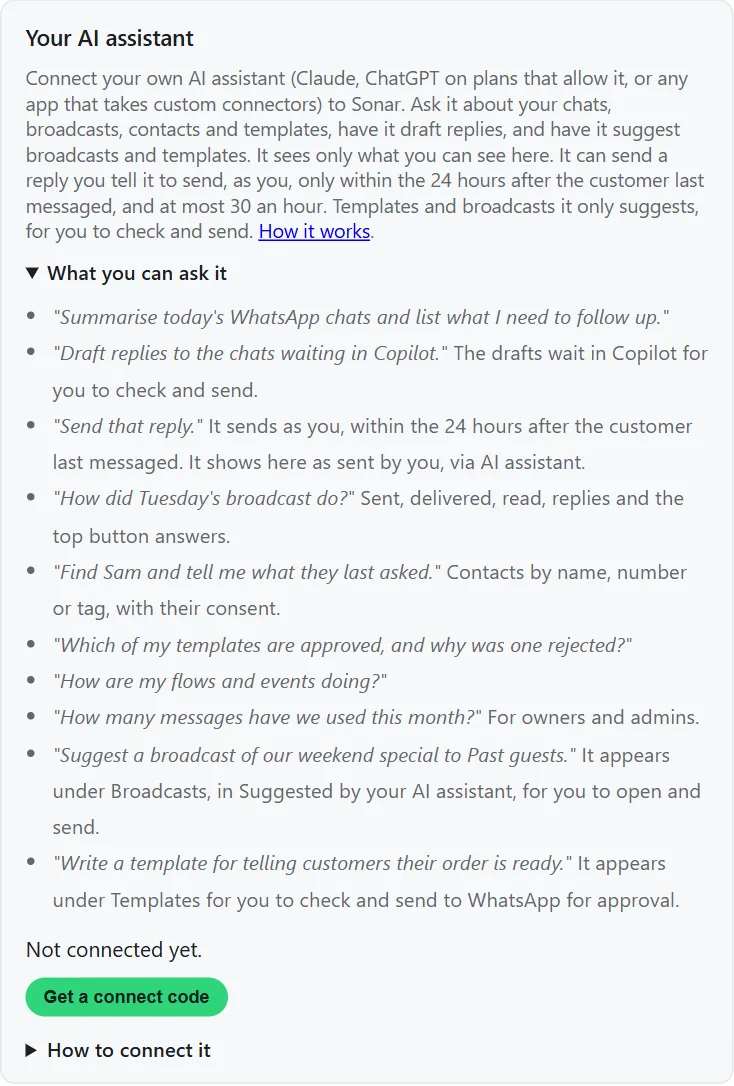
What you can ask it
- "Summarise today's WhatsApp chats and list what I need to follow up."
- "Find this customer and tell me what they last asked." It looks up contacts by name, number or tag.
- "How did Tuesday's broadcast do?" Sent, delivered, read, replies and the top button answers.
- "Draft replies to the chats waiting for one." The drafts wait in Sonar's Copilot for you to check.
- "Send that reply." It's built to send only a reply you've told it to send, inside the 24 hours after the customer last messaged.
- "Which of my templates are approved, and why was one rejected?"
- "Suggest a broadcast of our weekend special." It saves the idea in Sonar for you to open, check and send.
- "How many messages have we used this month?" For owners and admins.
What it can and can't do
- It signs in as you. You get your own connect code and secret in Sonar, and enter them on Sonar's sign-in page. Disconnect in Sonar and it stops at once.
- It sees what you see. Only the numbers and chats you can open in Sonar, nothing more.
- It only sends normal replies, and only in the 24 hours. WhatsApp only allows a normal message within 24 hours of the customer's last message, so that's all it can send, in a chat you can see. Each one shows in Sonar as sent by you, via AI assistant.
- At most 30 sends an hour per person, so a mistake can't run away.
- No templates or broadcasts. It can suggest them, and a person checks and sends them from Sonar.
- Your AI app reads the chats it works on. They go to Anthropic or OpenAI under that app's own terms, so use an account your business is happy to share customer chats with.
Connect it in about 2 minutes
- In Sonar, open My account, find Your AI assistant and press Get a connect code. Copy the code and the secret. To connect another app later, press Show secret and type your Sonar password.
- In your AI app, add a custom connector with this address:
https://sonar-mcp.whats-hub.co.za/mcp - A Sonar sign-in page opens. Enter your connect code and secret.
- Ask it something, like "Summarise today's WhatsApp chats."
Claude
Custom connectors work on every Claude plan, including Free, which allows one. Open Connectors in Claude's settings and choose Add custom connector. On Team and Enterprise plans an owner adds it. Anthropic explains it here.
ChatGPT
ChatGPT takes custom connectors on the web, not in the phone app, and only on some plans. On Business, Enterprise and Edu, a workspace admin adds it under Plugins, then Add custom MCP server. On Pro, OpenAI allows reading only, so it can't send. OpenAI changes which plans get it, so check your plan in OpenAI help.
Other apps that take custom MCP connectors can use the same address.
Which Sonar plans have it?
Every plan, including the free trial. It costs nothing extra in Sonar, and replies it sends count like any other message. Your AI app's own plan is between you and Anthropic or OpenAI. See pricing.
Want Sonar to answer customers by itself instead? That's the AI Agent.
More guides
- WhatsApp pricing in South Africa
- POPIA and WhatsApp marketing
- Event invites with one-tap RSVPs
- AI Agent and Copilot: a WhatsApp chatbot in your voice
- Use Sonar with the WhatsApp Business app
- Disconnect your WhatsApp Business app number
- Import your contacts
- Order and booking updates from your other systems
- Which number to use for WhatsApp
- What Meta needs from you before Sonar can send
- Connect a client's WhatsApp number
- WhatsApp API providers in South Africa, compared
- How WhatsApp flows work
- Integrations: WhatsApp connected to your other tools
- Developers: API and webhooks
- Switching to Sonar
- WhatsApp marketing that earns B-BBEE points
- WhatsApp RSVPs for events
- Competitions and prize draws
- WhatsApp error 2388386: why can't I add another number?
- WhatsApp error 131047: why wasn't my message delivered?
- Do you need 30 days on WhatsApp before Meta business verification?
- Can I move a WhatsApp number to another Meta business portfolio?
- WhatsApp error 131042: how do I add a payment method?
- Can I connect Sonar to Zapier, Make or Google Sheets?
Need a hand?
Email support@whats-hub.co.za and say which AI app you use. We'll help you connect it.